Thursday, April 7, 2016

Simplex Noise

Last time we made good progress on our planets. We made it so that when we are high above them they will have very little detail and when we are own the ground they will have lots of detail. However, we still just have a circular planet. We are going to need a way to give it more detail. To do this we are going to use a new noise algorithm, Simplex Noise.

Simplex Noise was actually designed by the same person who designed Perlin Noise, Ken Perlin. He considered Perlin Noise to have too many problems and to be poorly done and he wanted to correct those. Not only did he fix the problems that Perlin Noise had, he also successfully made a faster algorithm. Speed is going to be vital to us when we start moving around the planet because we want to render this in real time so this algorithm works perfectly for us. Let's take a look at how it works.

We can see here that the bulk of our algorithm is in the method called RawNoise3D. Simplex Noise has the advantage of being able to be done in multiple dimensions. We are rendering a 3D planet so we want 3-dimensions. This means that noise will wrap around the planet evenly and we will not see differences across different faces. Perfect!

The actual algorithm uses a "seed" of permutations to manipulate the data around a certain point, not the actual point itself. The math behind it is rather complex so I will not be going over it in detail. The next snippet we see is our two methods that we will use.

The method OctaveNoise3D is where we have variables that start to make the algorithm work. Then ScaledOctaveNoise3D will generate values that are in between an upper and lower bound. These are the two that we will use when generating our examples. Lets run it and see how it looks.
We can see here that this looks a lot like Perlin Noise! That's because it is. They both generate similar results but they do so in different ways. This will be what we use to make our terrain for our planet.

As usual the code is in Github here. I hope you enjoyed this and learned something new. Thanks for reading.

Wednesday, December 9, 2015

Procedural Generation in the Real World

Welcome back! So last time we tried to make procedural planets. We sort of achieved that but they didn't look that great. Our method may not have been the best but we also described others and there are real examples of people doing that, so let's take a look.

I think one of the most impressive examples of procedural content generation to date is No Man's Sky. I mentioned this game briefly in my last post but today I want to talk more about. No Man's Sky is impressive for a number of reasons. It achieved what we tried to do and generates procedural planets but it does so much more. No Man's Sky generated an entire procedural universe. A universe far bigger than any one person can ever explore. Each planet is unique and live demonstrations often surprise even the developers of the game because they find new generated content so frequently.
The above video is one of the developers showing off the game and talking about it. I highly recommend you watch it as it is very impressive what these people have made. Every planet has its own ecosystem. Plants, animals, biomes, all unique to each planet and all generated randomly. This game is an incredible feat of procedural content and I am personally extremely excited for the game to be released and to explore it.

The other example I mentioned in the last post was Space Engine. Space Engine generates the entire universe starting with out solar system. It uses realistic physics when creating these planets so many of them, or similar versions of them, can be found in the real world.

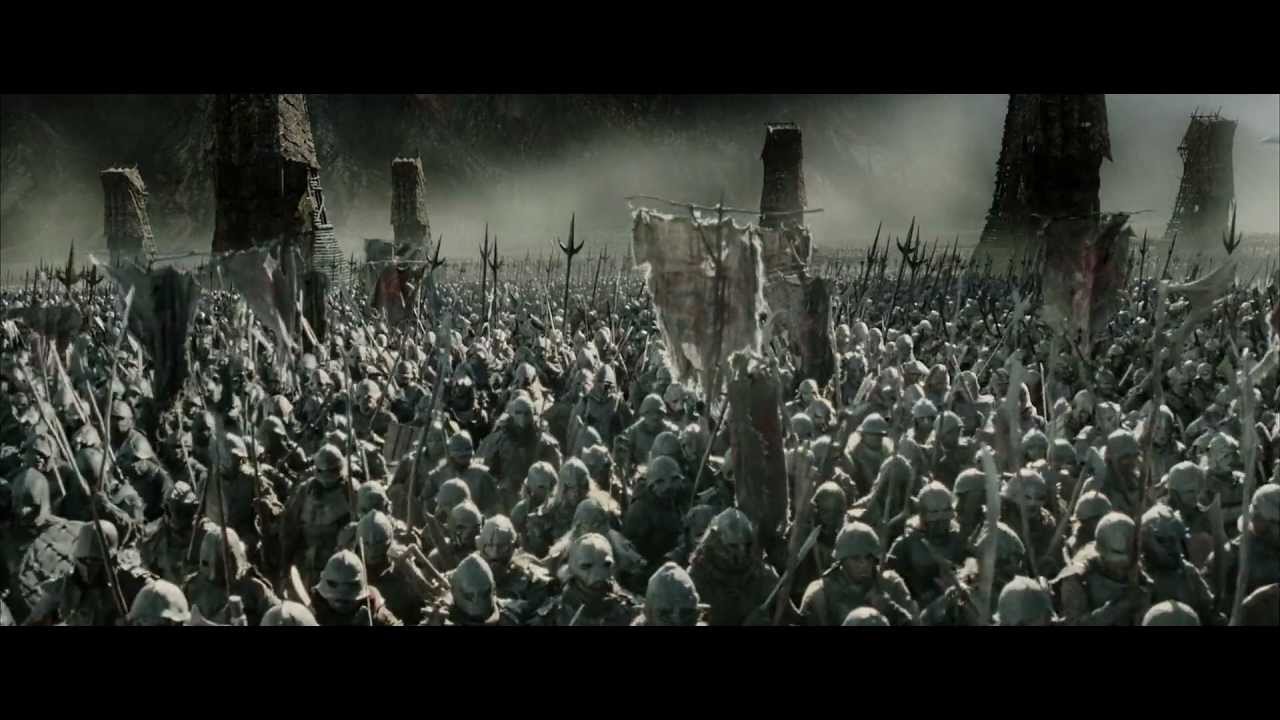
Video games aren't the only place procedural generation is used either. It is also popular in film and one of the best examples of this is Peter Jackson's The Lord of the Rings movies.
Above is a shot from the film of a massive Orc army. Each of these soldiers was based on a basic orc model. From there a computer made changes to each's appearance and placed them in after filming. This allowed Peter Jackson to create a massive army where no two soldiers are the same.

Procedural content generation has come a long way. We saw in an early post that it started with dungeons in rogue-like games, and today, it has progressed to the ability to generate an entire universe and create armies. As technology progresses more and more, so will the procedural content generation methods, and it will be interesting to see what we can create.

Procedural Planets

We've come a long way. Starting with a simple dungeon all the way up to the noise functions. Having made it this far is an accomplishment. It's time to move onto bigger and better things though. All of our past posts have been dealing with 2-dimensional content. Today we are going to start 3D, specifically 3D planets ( A.K.A. normal planets ). Procedural planets are a pretty popular topic currently. There are many video games like No Man's Sky ( We are going to talk in more detail about this game in the next post ), and the impressively realistic Space Engine among many others that generate these procedural planets. So let's first talk a little bit about some ways it's done first.

As you have previously seen, there are many ways to accomplish a task with procedural content generation, this is no exception. One way to generate procedural is to actually start with a cube and use a noise function like Perlin or Worley and adjust the points on the cube based on those height values. From there the cube is then projected to a sphere and you have a planet with terrain!

This is not how we are going to do ours though. We are going to do something completely different in fact. While doing some research I stumbled upon one persons interesting idea on procedural planets. It was relatively simple to implement however he had not done it. So I decided to implement it for this post and see how good the generated planets look.

The basic idea is as follows. You first generate a plane with a random rotation around the x, y, and z-axis. You then get every vertex on your planets surface and dot product it with the planes normal vector. If the dot product is greater than zero you move the point in a small amount, if the dot product is less than zero you move it out a small out, and if that dot product is zero, you leave it alone. This is done over a number of iterations with a random plane each time and it will generate peaks and valleys due to the random moving in and out of points. Pretty clever, so let's implement it.


As you can see, there's quite a bit of new stuff here that we have never seen before. That is because this is part of a bigger project. There's a considerable amount of code that is rendering the planet, moving the camera, and things like that. We're not gonna talk about that cause that's a different blog. We're interested in the code above.

As you can see we first make a normal vector that is the planes normal. This is random and each value is between -1 and 1. We create a scale value and determine how many iterations we want to do. We loop through the iterations and loop through each vertice with each iteration doing the dot product each time and moving the points by a scale value. So, let's run it and see how it turns out.

First, this is what our "planet" looks like before we did anything to it. I applied a random texture I had readily available. At this point it's a perfect sphere so all is good.

Next, I ran it over 1 iteration just to test if this idea would even work at all. It did! It created a weirdly shaped planet by moving the bottom inwards and the top out. Great! Let's run it over a larger number of iterations.
Hmm... Interesting. This was run over 100 iterations. You can clearly see the planet was misshaped and now has a series of peaks and valleys. If you look at pictures of earth from space though you can't see the difference in elevation, it looks perfectly round and this doesn't! That is because this is on a small scale. In order to achieve that effect I would have to make the scale factor incredibly small and the planet incredibly large with a staggering number of vertices and I don't have the time for that.

Because of this, I would say the "planet" looks more like an asteroid. So perhaps our method needs to be slightly different. Maybe we will try a new method in the future. But for now, we have a starting place. We rendered some planets and we made them not perfectly spherical.

As usual, thanks for reading. Hopefully we get a better result next time. If you want to see the full source code go here. I have added all necessary code in the Prodedural_Planets folder so you can run it if you want. The code in this post is located in mesh.cpp.

Tuesday, December 1, 2015

Worley Noise

Previously we discussed two different noise algorithms, Diamond-Square and Perlin noise. Both of these noise algorithms produce similar results and can be used for a variety of things but there are certain places they aren't great. So today we are going to talk about one last noise algorithm that is versatile and produces results very unlike the previous two algorithms. That algorithm is Worley Noise. Also referred to as Cell Noise or Voronoi noise, this algorithm is very useful in generating or simulating stone, water, and cells. So lets get started in talking about this!

Worley noise is one of the more complicated noise function we've covered. Not only that, it is also the slowest of them. It however is more customizable than the other ones. We will see examples of this at the end. First, lets take a look at our constructor.


Here we can see where everything is set up. We have a variable called permutations that is set with unique values from 0 to 255. These numbers are then swapped around to make them in a random order. These are used to determine the location of the "cells" in the final image. In the constructor we call the fill_map method which can be seen below.


The idea of the fill map method is simple. It iterates through each pixel and determines the color it should be. Along with that it also saves the maximum and minimum values that are seen. These can be used for scaling if necessary. In the fill_map method we see smoothed_noise is called so lets look at that.


The smoothed_noise method is where all the calculations are done. All of these are based on distances which will return the grayscale value for that pixel. How this is done can vary though. In the code we see 3 commented out lines. If one is uncommented we can get a completely different looking picture. These are the distance functions and they are what make this algorithm so powerful. By simply changing the distance algorithm a stone texture, water texture, or many other textures can be created. We will see examples of all of these when we actually run the algorithm. Let's take a look at how these distances actually work.


Each distance method is a form of the distance formula ( sqrt( x2 - x1 ) ^ 2 + ( y2 - y1 ) ^ 2 ) ), but they all have their own touches. So now that we have a basic understanding of the algorithm, lets see what it actually outputs. Up first we are going to use euclidean distance.
Euclidean Distance
Here we can see the algorithm output a picture that looks similar to cells. It's very unlike every other noise algorithm we've seen this far. Next, manhattan distance. 
Manhattan Distance
Manhattan distance creates diamond-like shapes. It also creates some very light and very dark areas which can be seen above. Now, chebychev distance.
Chebychev Distance
Chebychev has a similar look to manhattan although instead of diamonds they are more square and very interesting looking. Lastly let's look at quadratic distance. 
Quadratic Distance
Quadratic creates a similar look to euclidean but slightly different. All of these distance function can be modified and more can be added to create many different and unique effects. It's just a matter of playing with them.

As usual I hope you learned something new or found this interesting. For the full source code you can go here. See you next time!

Wednesday, November 18, 2015

Perlin Noise

Welcome back! Last time we discussed the Diamond-Square algorithm. While that algorithm works great for certain cases, it had its drawbacks that we discussed last post. Instead of fixing those we're gonna just implement a different way to get similar results. That way is Perlin Noise!

So what is Perlin Noise? Well similarly to Diamond-Square, it's a way of generating random height-maps that can be used for a number of things. Games are generally a place they are used commonly to create random terrains. It is very simple to implement and produces much better looking results than Diamond-Square as it does not have the same artifacts. The biggest drawback to Perlin Noise is that it is slightly slower than Diamond Square and it can only generate squares. Both of these can be worked around though so lets dive into the code.


Above we can see the constructor for our Perlin Noise class. We haven't looked at most of the constructors before but this one does more than most. In this one we fill a vector with random values. These random values are dependent on our seed and act as the "gradient" for the rest of the algorithm which will be talked about more later on.


Here we have our perlin method. This is where the majority of our calculations and code is. There is a lot of stuff going on here so I will cover the basics. If you are very interested in each low level idea, Ken Perlin wrote an entire paper about Perlin Noise you can read. So, carrying on. First we take the floor of our values and bitwise and them with 255 ( Read here if you don't know what bitwise operations are ). We then subtract these values from the floor of themselves. Then we see another method we haven't seen yet, fade. Let's look at fade.


Here we can see all of the methods we haven't seen yet. Fade and grad are actually unique in that every implementation of Perlin Noise is supposed to/should use the same equation made by Ken. You can see it is just a simple math equation where we multiply and add some values. So carrying on, we can next see where our gradient values come on. These are chosen based from our x, y, and z, and the subsequent variables that came from them. We then see the grad method actually used. Here a series of bitwise operations change the values. These help insure randomness. They are then linear interpreted ( lerp ) with each other in our lerp method. This is just a stand linear interpolation, nothing fancy. This is done multiple times over every point. So how do we actually use this?


Above is our to_png method. We need some visual representation to output this to to see our results and that is how we do it. So lets run it and see what it looks like.
Wow, look at that! It looks random! And every time we run it it will be random. But wait... What is the commented code? Well with Perlin Noise we can easily modify the produced values to create something... different. Let's uncomment that code and run it and see what happens!
Wow! Look at that! That commented code works well for producing a wood-like texture. Pretty nifty. Playing around more can create different effects but I will let you explore them yourselves. Hope you enjoyed this and learned something new. As usual, see the full code here.

Sunday, November 15, 2015

Diamond Square

Last time we talked about the Midpoint Displacement algorithm in preparation for the Diamond Square algorithm. Dimond Square is basically a 2D version of Midpoint Displacement. It has lots of use in modern video games due to its speed and ease of implementation. So let's get started to see how it actually works.


Wikipedia has a helpful image to help easily understand the algorithm. First four corners are selected and their height values are remembered. Those values are averaged and given a random offset value. The center of those four is now the new corner. This is the diamond step. The square step is next. The middle is used as a reference and each point out from it is set to a random value and the average of the four corners. This is repeated multiple times. 

In the code below we can see the implementation of the "generate" method. This method is where the bulk of the work for Diamond Square is done. It loops over the grid a certain number of times, each time doing a "diamond' step and a "square" step as discussed above.

Then below we can see the implementation of the actual diamond_step and square_step methods. These do as discussed in the description above.

The last bit we have to talk about is the sample method. This is a clever method that uses bit operations to get locations on the map. Because of how it works it allows the map to wrap around itself and generate maps that have borders that will be seamless. We can see the actual implementation below.

Now that we see how it works, we can see the result!
This is an example output. We can see the high areas are lighter than low areas. This has a fault though which is discussed below.

While this algorithm has advantages, it also comes with some downfalls. One of the notable downfalls that affects many when using this algorithm is that it has a tendency to generate ridges in lines. So many times there will be a set of ridge peaks or valleys at very similar locations. There are ways around this but those are out of the scope of this post. Another downfall is that the map has to be a size of 2^n + 1. This is rarely a problem but can be if you need a certain sized map. The simplicity of this algorithm is what makes it so powerful and why these downfalls are rarely an actual problem.

Thats the basics with Diamond Square. It's a simple implementation and generates random results. As usual hope you learned something and heres the full code.

Wednesday, November 4, 2015

Midpoint Displacement

Up until now all of our programs have been printing grids to console. These were cool to look at but were often only useful for a very specialized purpose. Because of this were are going to do something very different. We are going to write our own Midpoint Displacement algorithm. Midpoint Displacement is a form of the Diamond-Square algorithm ( another algorithm we will be covering later on ). These two algorithms are very similar the main difference being Midpoint-Displacement outputs a line while Diamond-Square outputs a grid. However, to better understand Diamond-Square we later on we are starting simple with Midpoint-Displacement. So let's get started!

Midpoint-Displacement is an extremely simple algorithm ( I wrote a Java version back in high school its so simple ) but it creates unique and interesting outputs every time we run it. The algorithm works as follows. First, two endpoints are created. These will be used as anchors. A midpoint is then found between the two points and it offset by a random number based on a "roughness" value. The algorithm is then run again doing the same thing. Finding the middle between each point and raising or lowering the point based on the "roughness." The idea is simple so let's see what it looks like in code.

Extremely straightforward. The method calls itself each loop around and makes sure that it is only doing the number of points that there should be. We can see there are two methods that we use that are not in the code so we can look at those briefly below.

The "middle" method is just your run of the mill midpoint formula that you learned in elementary school. Then with the "displace" method we can see that we keep the x-value the same and modify the y-value based on it's current value plus a random number in between the negative roughness and positive roughness.

In order to see how what this outputs, I wrote a small method that plots the x and y values on a black image. So when we run the program, we might expect to see something like this.
Or something like this.
We can see that the Midpoint-Displacement algorithm generates ridges and valleys. This has some practical use in real games too! 
I lot of people probably remember playing that game ( or something similar ). It used an algorithm similar to Midpoint-Displacement to create its random and interesting terrains. 

We've got a basic understanding of Midpoint-Displacement now so we can next talk about the Diamond-Square algorithm! This algorithm also has a lot of use in real life games. As usual, hope you learned something and you can see the source code here.